onSite

Construction project management · South Africa

Run the build.
Hand over the keys.

onSite is project management software for South African residential builders. It keeps the QS budget, every supplier quote and invoice, your client's bills and your site team's photos in one place — from the first slab to handover.

  • Built in Johannesburg
  • Rand & 15% VAT
  • Office, site & client in one
  • No app store needed
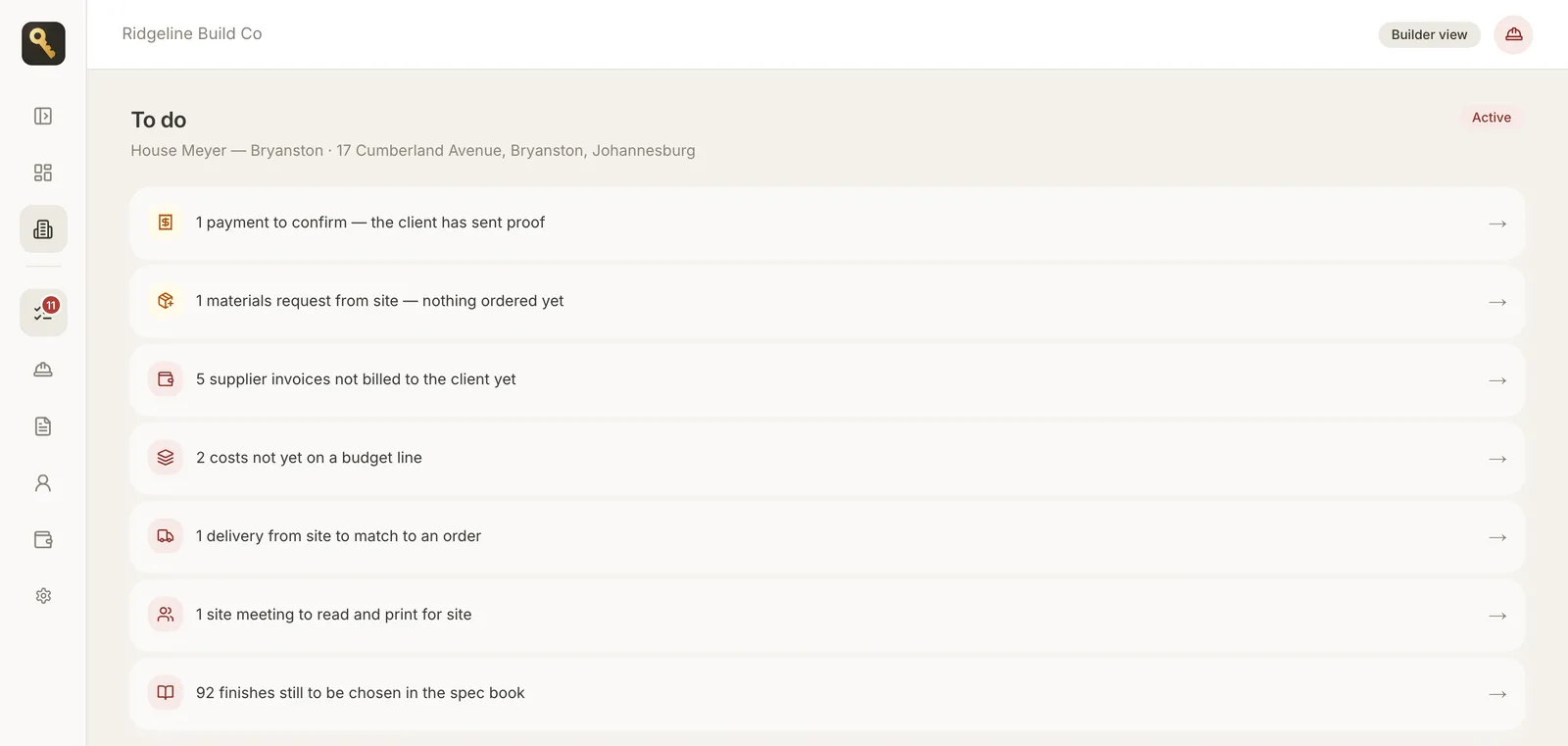
onSite office To do list for a Bryanston house build: a payment to confirm, a materials request from site, supplier invoices not billed yet, and costs not yet on a budget line
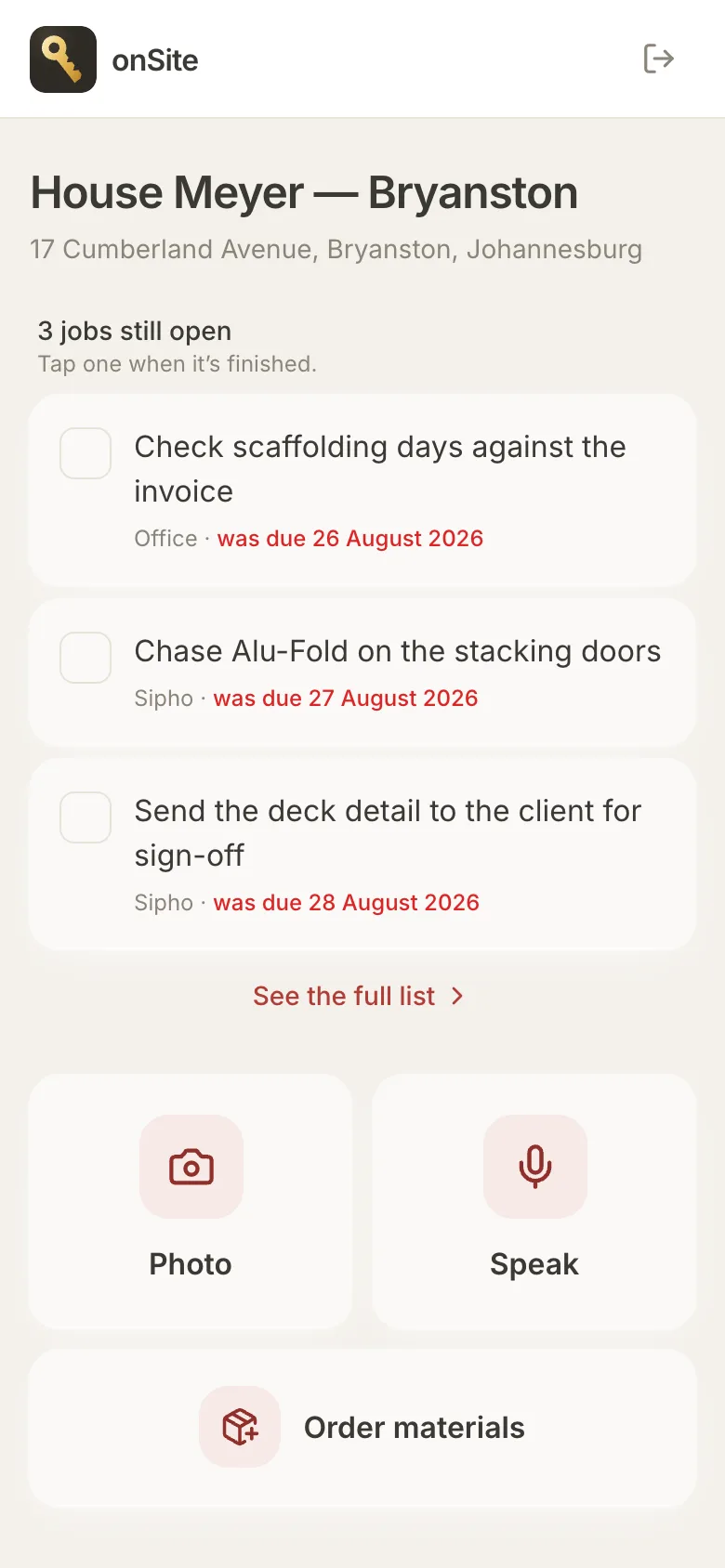
onSite site app on a phone: open jobs list with Photo, Speak and Order materials buttons

What is onSite?

onSite is a build-phase project management app for builders who run residential new builds and renovations in South Africa. The office manages the budget, suppliers and client billing on a desktop; the site team works from a phone; and the homeowner gets their own portal to follow progress and pay.

It is the sister product to SnagIT: onSite covers the build up to handover, SnagIT covers the house afterwards.

Made for
Residential builders & PMs
Who pays
The builder, per project
Free seats
PM, site team, client
Money
ZAR · VAT at 15%
Runs on
Browser, iPhone, Android
Covers
Build start → handover

Why builders switch

A build runs on three things that never agree.

The QS lives in a spreadsheet, the invoices live in someone's inbox, and what happened on site lives in a WhatsApp group. onSite puts them on the same page.

Are we still inside budget on electrical?

Every supplier invoice is placed on a QS line, so spent, on order and left to spend are always current — per line, per section, per job.

Did we ever bill the client for that?

The To do list flags every supplier invoice not yet billed and every cost not on a budget line, so nothing quietly comes out of your margin.

What's actually happening at my house?

Your client sees photos, milestones and bills in their own portal — so the Sunday-night phone call becomes a notification.

How it works

One job. Three screens, each built for the person holding it.

onSite isn't one app with menus hidden by role. The office, the site and the client each get their own surface, sized for the device they actually use.

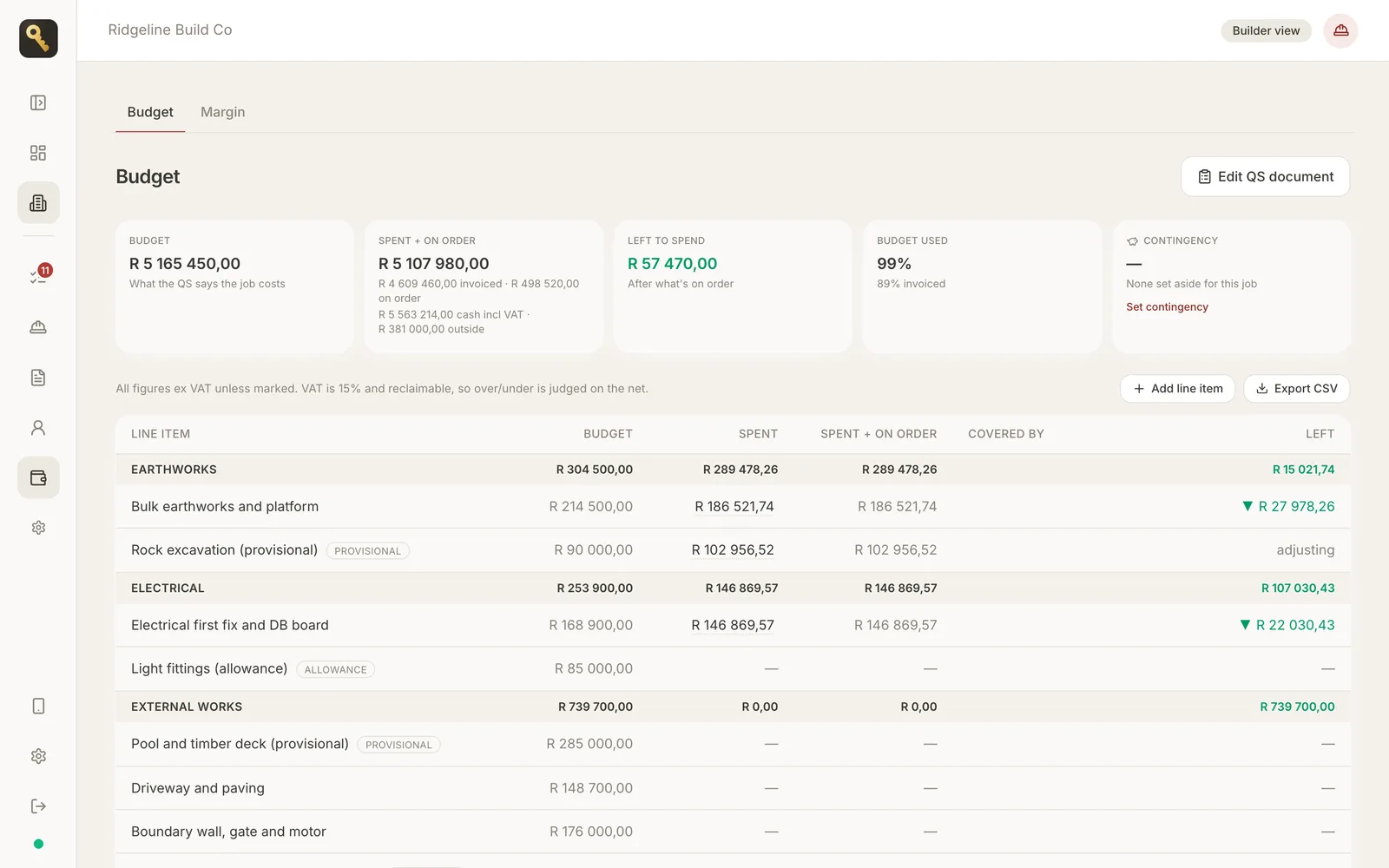
onSite Budget page: R5.16m QS budget with spent, on order and left to spend per line item, provisional and allowance lines marked
Office · desktop

The office runs the money

Owner, admin and PM. Five menu items per project — To do, Site, Documents, Client, Budget.

  • Budget against the QS
  • Quotes, invoices & credit notes
  • Client billing & margin
onSite site mode on a phone: three open jobs and Photo, Speak, Order materials buttons
Site · phone

The site gets three buttons

A to-do list and Photo, Speak, Order materials. No tables, no totals, no QS. Site staff can't open the office screens at all.

  • Progress & delivery photos
  • Voice notes & site meetings
  • Materials requests to the office
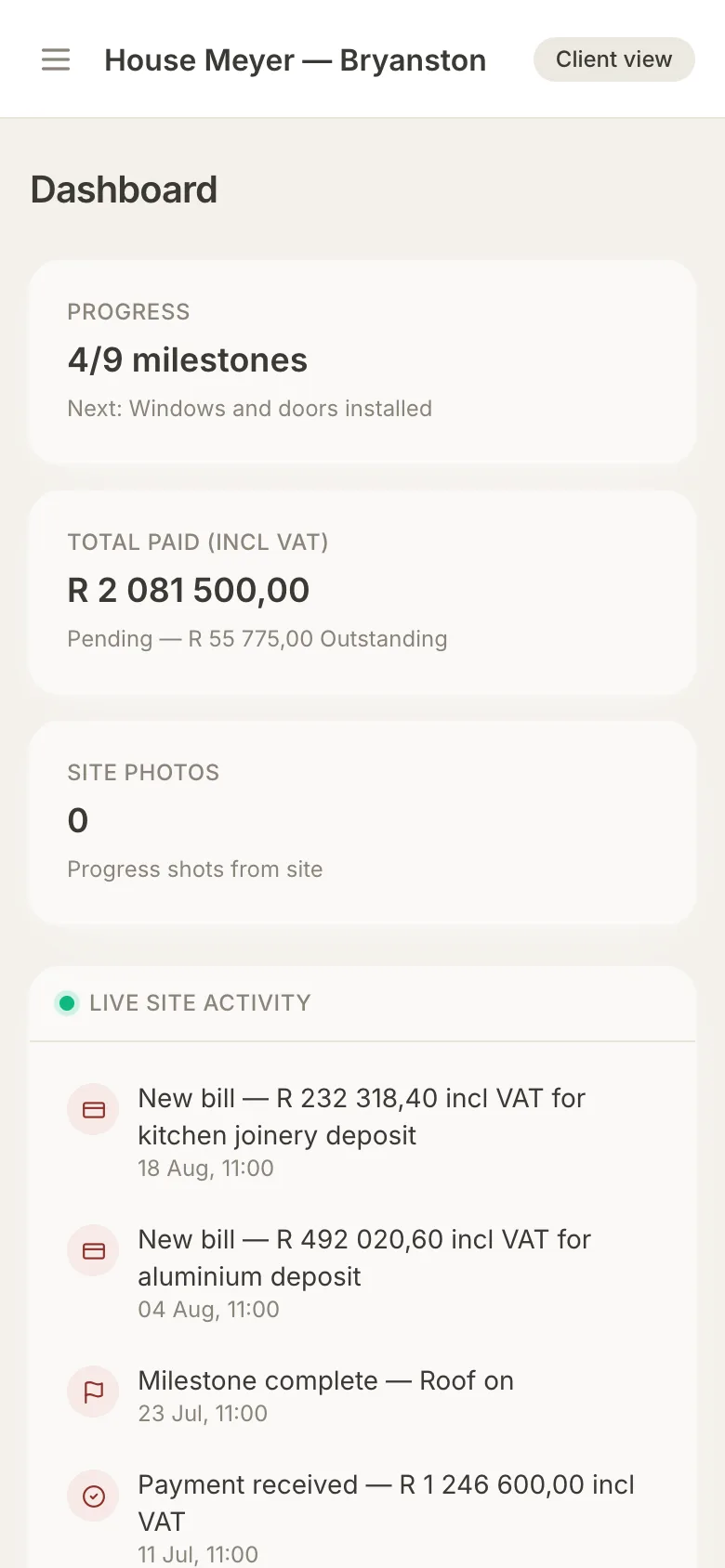
onSite client portal dashboard: 4 of 9 milestones, total paid incl VAT and live site activity
Client · any device

Your client sees their house

Progress, photos, bills and the spec book — and never your supplier costs.

  • Live site activity
  • Bills with proof of payment
  • Ask a question on a photo

The money record

From the first QS line to the last payment.

Every rand on the job follows the same path, so the budget, what you've billed and what's in the bank always reconcile.

  1. Load the QS

    Import the bill of quantities from Excel. Lines can be firm, provisional or an allowance, grouped into sections and categories.

  2. Compare quotes

    Supplier quotes sit side by side, with delivery included or not clearly flagged. Accept one and it becomes an order against the QS line.

  3. File the invoices

    Invoices arrive by email, upload or a photo from site. AI suggests the budget line; you confirm. Credit notes net off automatically.

  4. Bill the client

    Raise a bill from a pro forma or an invoice — never from a quote. Markup and 15% VAT are worked out for you.

  5. Get paid by EFT

    The client pays your account as usual, uploads proof of payment in their portal, and the office confirms it.

  6. Know your margin

    Billed less cost, split into markup earned, your own fees, costs passed through, and costs you haven't billed yet.

Three ways to charge a client in onSite
Charging modeWhat the client seesWho they pay
Markup in the priceYour bill only, with your bank details. Supplier prices stay private.You
Open book + feeThe supplier document, plus one bill from you that includes a builder's fee line.You
Client pays suppliers directThe supplier paperwork, so they can pay it themselves.The supplier

Features

Everything a residential build needs. Nothing it doesn't.

A To do list that knows the job

Open a project and the first thing you see is everything waiting on someone: payments to confirm, deliveries to match, invoices not billed, finishes still to choose. It's the one place with a count on it.

  • Built from the job's own records, not a separate task list
  • Budget left, client owing and next milestone underneath
  • Switch off features you don't use, per company
onSite To do list with seven items waiting across payments, materials, supplier invoices, deliveries, site meetings and the spec book
Demo project: House Meyer, Bryanston.

Every document on the job, in one list

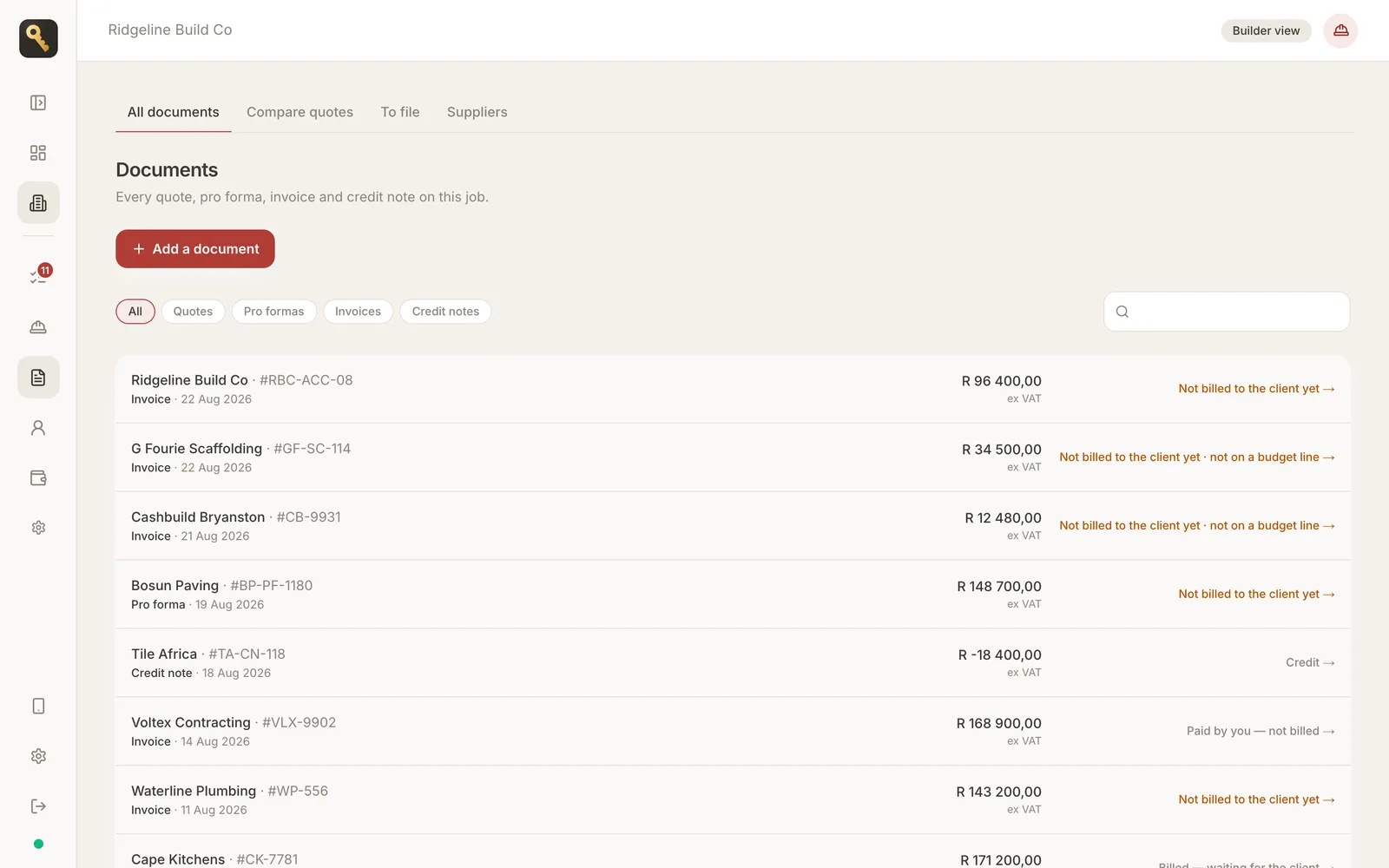
Quotes, pro formas, invoices and credit notes go in through one form, and each supplier line is placed on a budget line. The list tells you what's still to bill.

  • Forward documents to the project's own email address
  • Photographed slips from site land in the same inbox
  • Pro formas never count as cost; the invoice deducts what was already billed
onSite Documents page listing supplier invoices, a pro forma and a credit note with amounts ex VAT and billing status

A spec book your client fills in

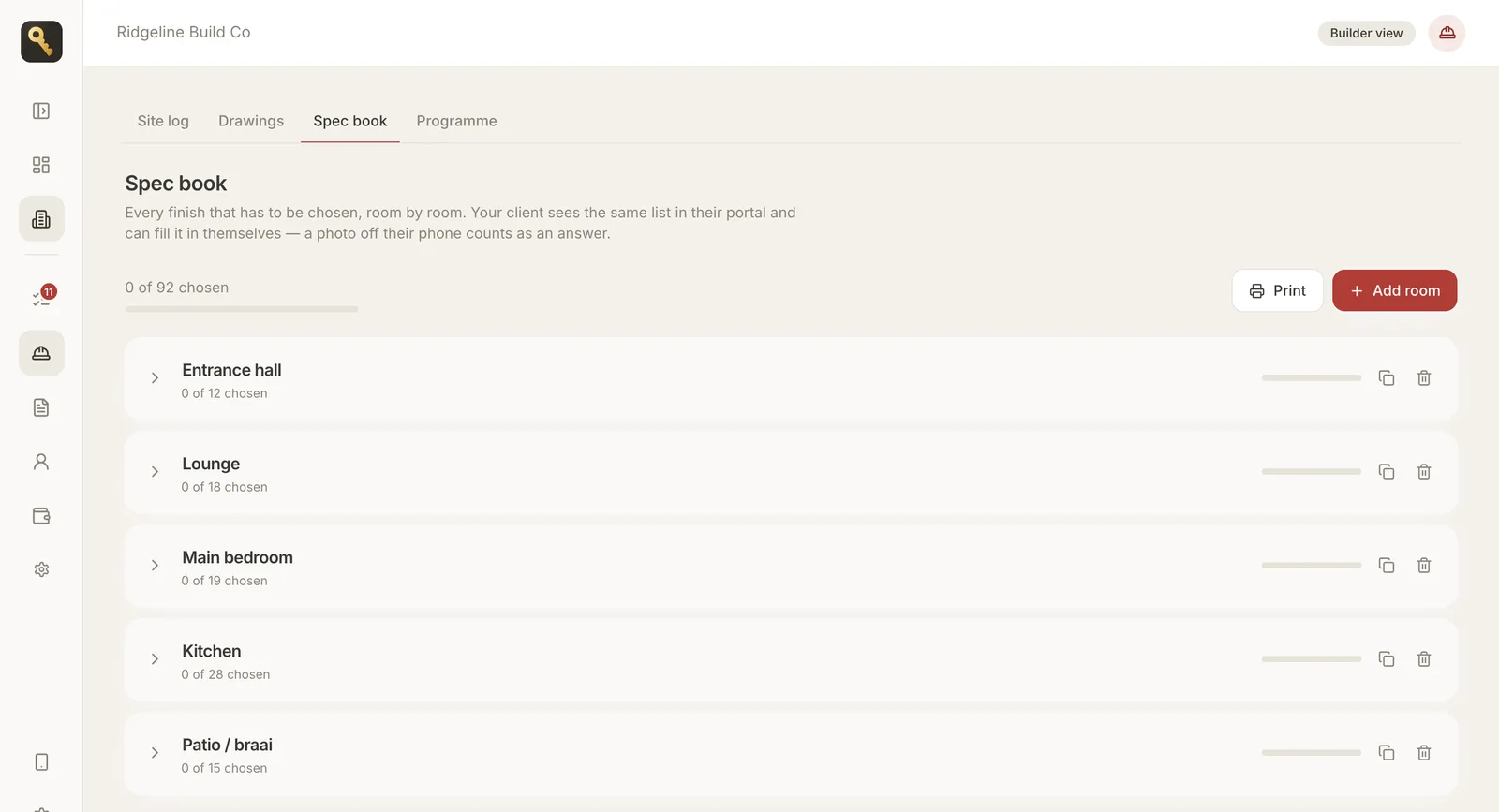
Every finish in the house, room by room, from 25 South African room templates — kitchen, scullery, en-suite, patio and braai, flatlet. The client answers with a photo off their phone and locks a choice when it's final.

  • Mark items "not applicable" so the count stays honest
  • Printable for site
  • Locked choices can't be changed by mistake
onSite Spec book: rooms including entrance hall, lounge, main bedroom, kitchen and patio with finishes chosen per room

A programme the client can follow

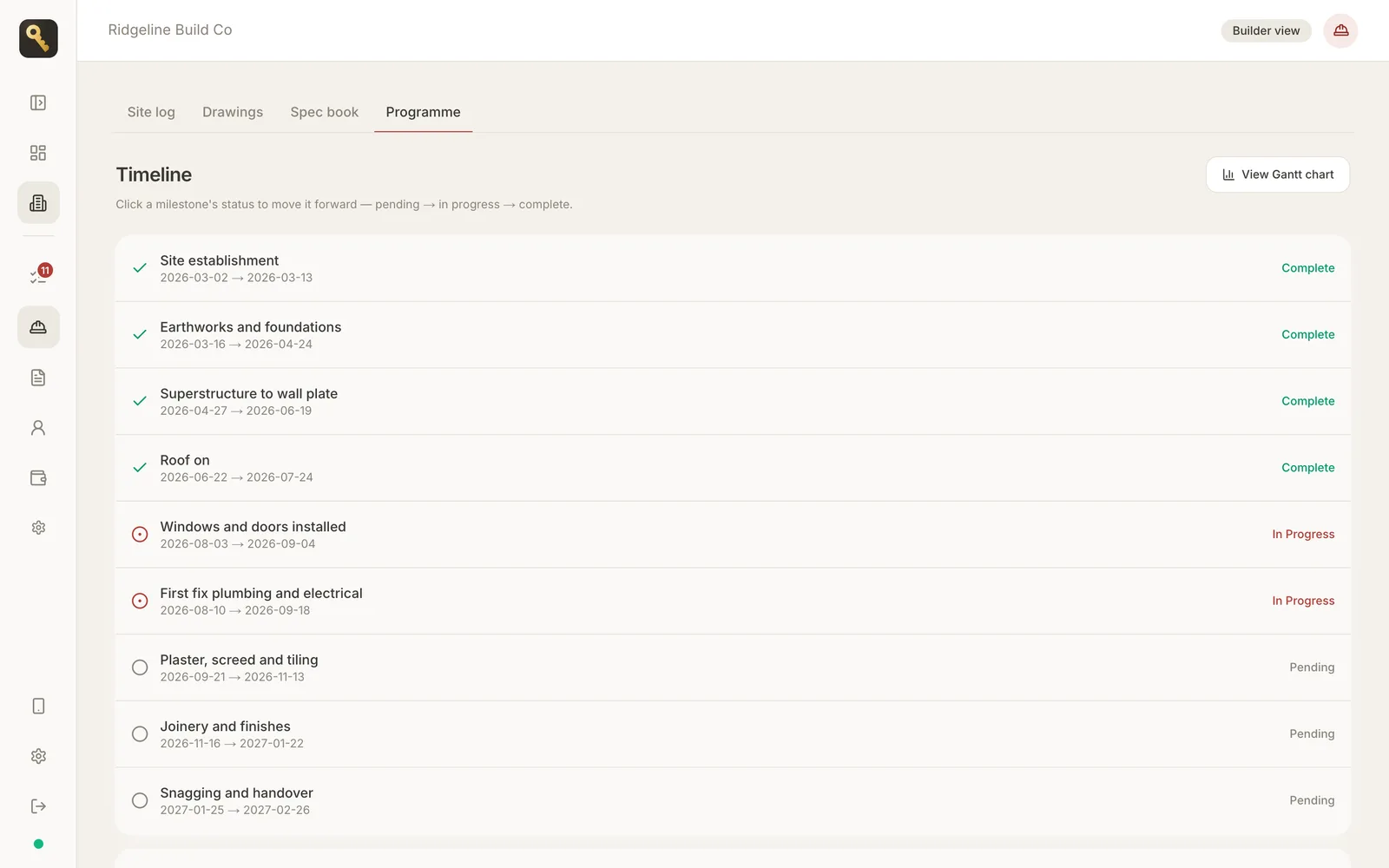
Milestones from site establishment to snagging and handover. Move one forward and the client sees it in their portal the same minute — and there's a Gantt chart when you need one.

  • Pending → in progress → complete
  • Feeds the client's live activity
onSite programme timeline: nine milestones from site establishment to snagging and handover with completion status

And the rest of the job

Excel QS import

Description and cost price required; any column order. Download the template in the app.

Variations

Log extra work the moment the client asks. An approved variation raises the budget on the lines it names.

Contingency

Set a contingency per job and draw it down against the lines that overrun.

Drawing register

Every sheet and revision. Site sees the current set only, with a warning when a sheet isn't for construction.

Site meetings in two languages

Speak the notes; onSite prints them in English and Xitsonga for the team.

Materials requests

Site asks, the office orders. A request never moves your committed cost until it's an order.

Deliveries with photos

Site photographs what arrived; the office matches it to the order.

Push notifications

Add onSite to your home screen and get alerts on iPhone and Android, no app store.

For your client

See what's happening in your house.

Your client is invited to their own portal — on their phone or laptop, no app to install. It shows them what they need and nothing that's yours.

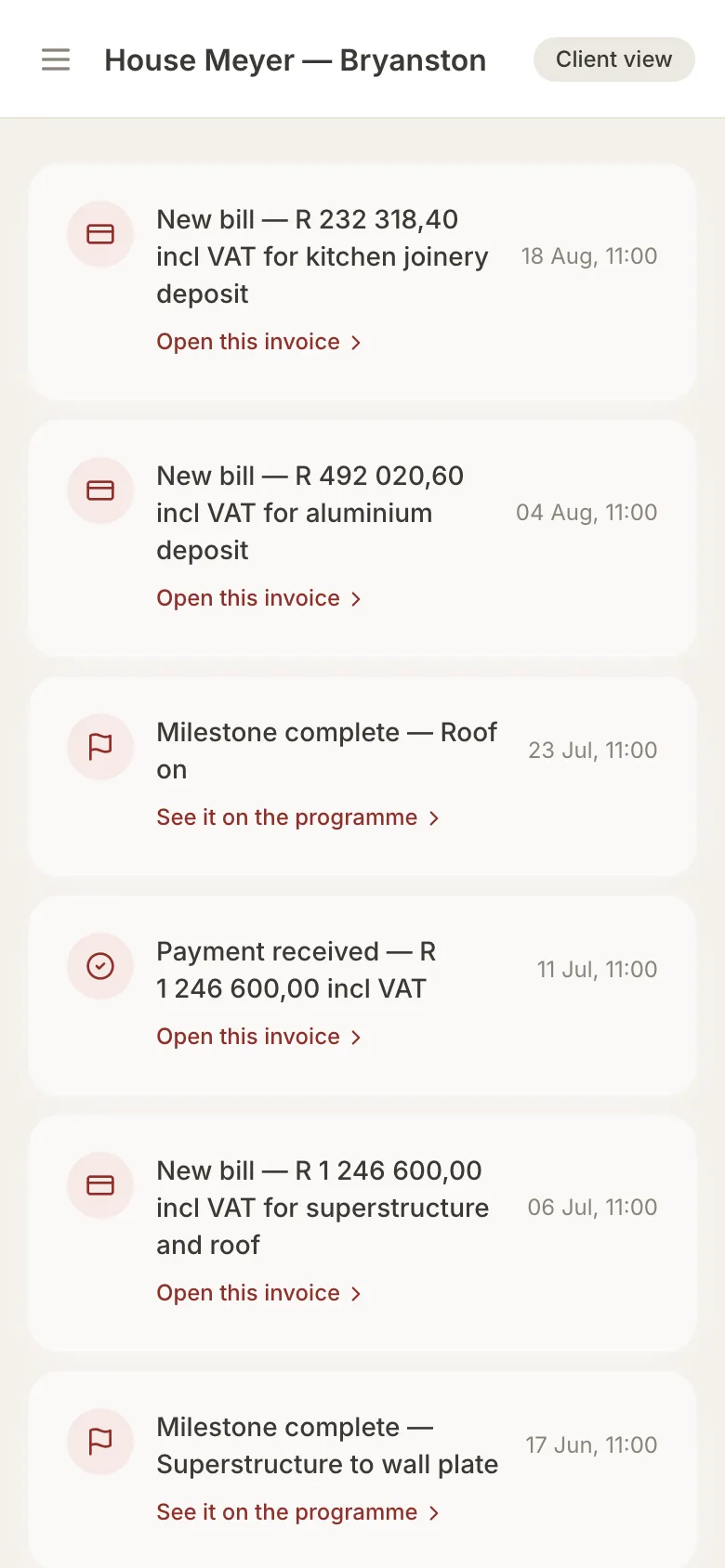
  • Updates — bills, payments, milestones and site photos as they happen
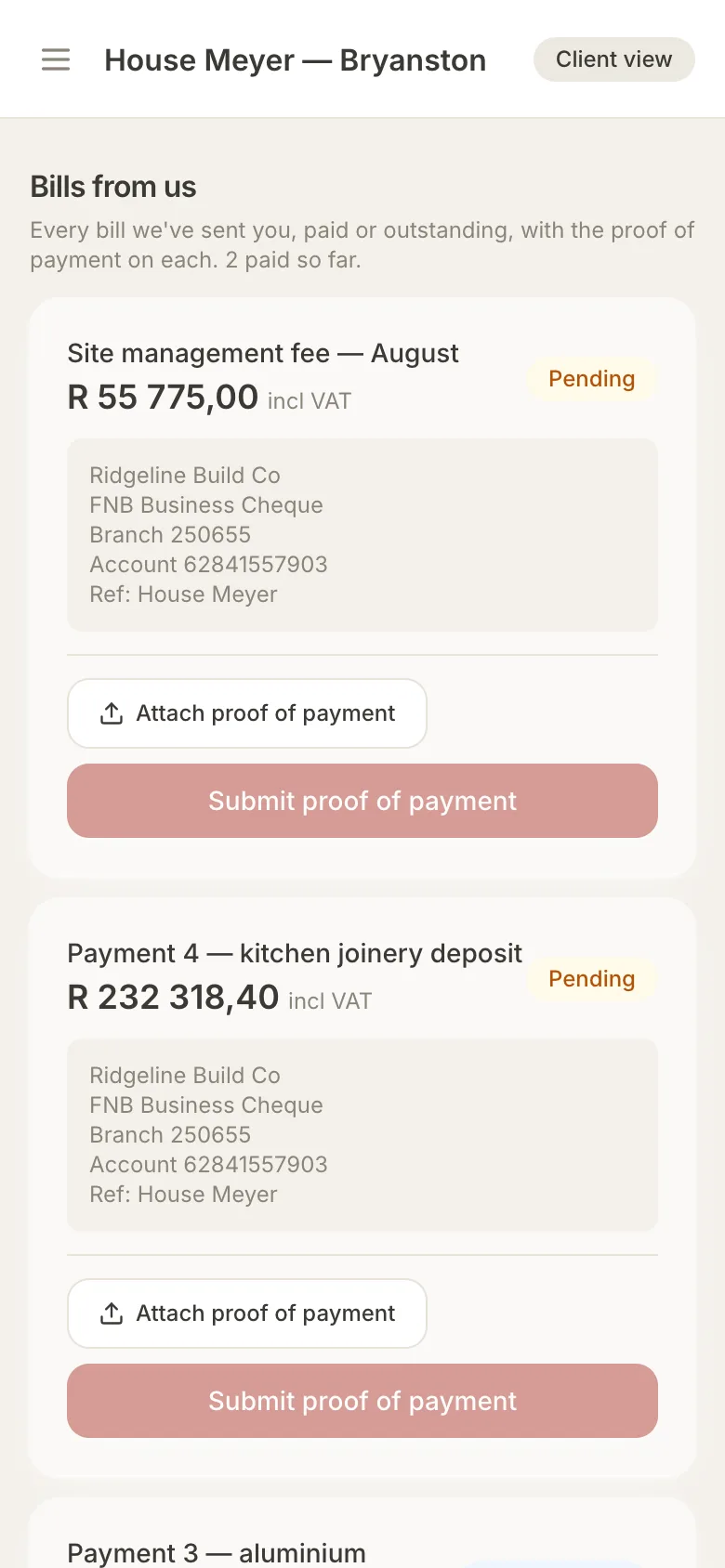
  • Bills — each one with your bank details and a place to attach proof of payment
  • Progress — the programme, read-only
  • Spec book — choose finishes room by room
  • Questions — ask about a progress photo and get one clear answer
onSite client portal updates feed: new bills, payment received and milestones completed
onSite client portal bills page with amount incl VAT, builder bank details and proof-of-payment upload

Your numbers stay yours

Your cost and your client's price are two different records.

Most tools keep one document and hide columns from the client. onSite keeps your real costs and the client's bill as separate, linked records — and the client's account has no database access to the cost side at all. It isn't hidden on the screen; it isn't there to find.

Unless you choose open-book charging, in which case the client sees exactly what you decide to share.

Compared

onSite vs. spreadsheets and WhatsApp

Spreadsheet + inbox + WhatsApponSite
Budget vs QSUpdated when someone remembersEvery invoice placed on a QS line as it's filed
Unbilled costsFound at final account, if at allFlagged on the To do list the day they arrive
Supplier quotesScattered across email threadsSide by side, with delivery terms shown
Client updatesPhone calls and voice notesA portal with photos, progress and bills
Proof of paymentScreenshots in a chatAttached to the bill, confirmed by the office
Site photosLost in a group chatFiled to the job, with the date
FinishesA PDF that's out of dateA spec book the client fills in and locks
MarginWorked out after the jobLive, split by where it came from

FAQ

Questions builders ask

What is onSite?
onSite is construction project management software for South African residential builders. It covers the build phase, from loading the QS to handing over the keys: the budget, supplier quotes and invoices, billing the client, the site team's photos and requests, and a portal where the client sees progress and pays.
Who is onSite for?
Building companies that run residential new builds and renovations, and the project managers who run jobs for them. The builder signs up and pays; the PM, the site team and the client are invited to the project at no extra cost.
Can my client see my supplier prices or my markup?
No, unless you choose open-book charging. Your real costs and the client's bill are kept as separate records, and the client account has no database access to the cost side at all. The rule is enforced in the database, not just hidden on the screen.
How do I bill my client?
Pick one of three charging modes per job: markup in the price, open book plus a builder's fee, or client pays suppliers direct. Bills are raised from a pro forma or a supplier invoice, never from a quote, and VAT at 15% is added if your company charges VAT.
How does the client pay?
By EFT to your bank account, as they do today. The client uploads proof of payment against the bill in their portal and the office confirms it, so nobody can mark money as received that hasn't arrived.
Does my site team need training or a laptop?
No. The site app opens on a phone with a to-do list and three buttons: Photo, Speak and Order materials. Site staff never see costs, tables or the QS, and are kept out of the office screens.
Do I need to download an app?
No app store. onSite runs in the browser and can be added to the home screen of an iPhone or Android phone, where it works like an app and receives push notifications.
Can I import my existing QS or bill of quantities?
Yes. Upload an Excel sheet with a description and cost price per line; category, supplier, quantity and unit are optional and columns can be in any order. A template is available to download inside the app.
How is onSite priced?
Per active project, paid by the builder — the same way a clerk-of-works or QS fee is built into the job. No per-seat charges for the PM, site team or client. Contact us for current pricing.
What's the difference between onSite and SnagIT?
They're sister products. onSite covers delivery, from build start to handover. SnagIT covers the property's operating life after handover: logging faults and getting them fixed.

See it on a real job

One house, start to handover.

We'll walk you through a full demo build — the office, the site app and the client portal — and answer the questions about how you run your jobs.